



|
Technical Documentation
This consists of an open source content management system, easy to use and which can be integrated to other technological management modules existing in the Institution. It allows one to create subject web page material, incorporate resources and links, as well as adding further functions. The documentation and source-code for this software is available in the following address: http://ecademicus-webs.sourceforge.net The British School 's Project runs within the framework of the Integra Project of the European Union, which has the objective of developing and improving the capacities of Latin American educational institutions , concerning the use and management of ICT's in different dimensions as applied to teaching and administration. The Project was designe d on the basis of experiences in Europe and Latin America, and it is supported by the following organizations:
This project has been carried out thanks to the teamwork of the following individuals:
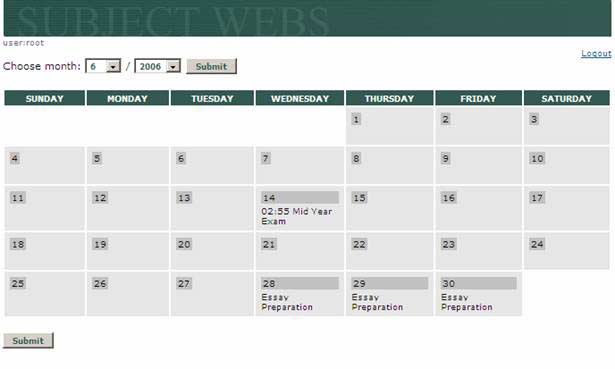
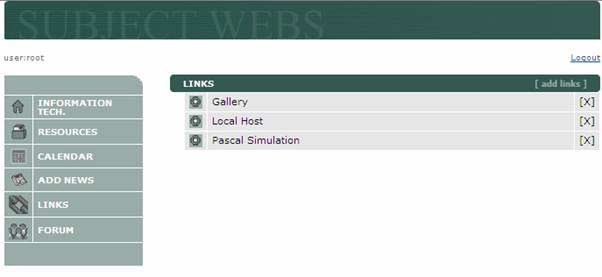
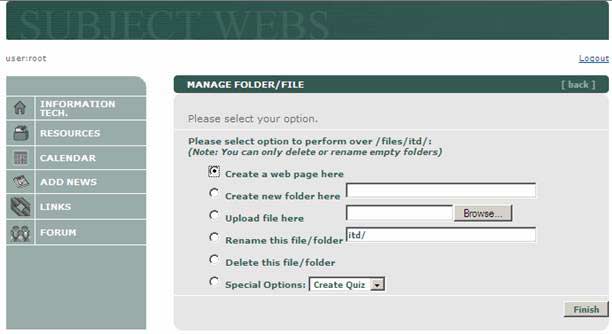
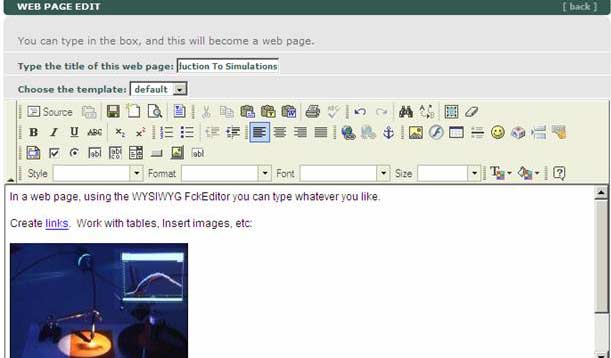
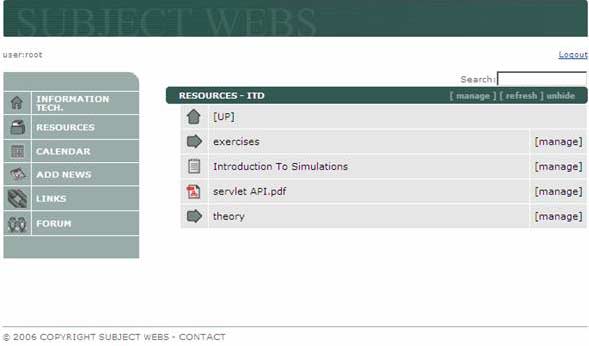
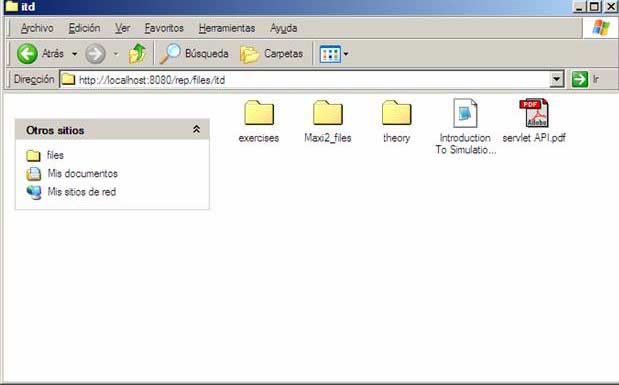
· Create / Edit /Remove Webs · Add links to a Web · Create a calendar for a Web · Add News for a Web · Add Calendar Events for a Web · Create Quizzes and download results in excel format. · Create and edit web pages using FckEditor, a WYSIWYG editor · Create and manage directories and sub-directories · Access and Modify your files vía WebDav (using Microsoft Web Folders, for example) · Search for texts in documents uploaded and web pages created.
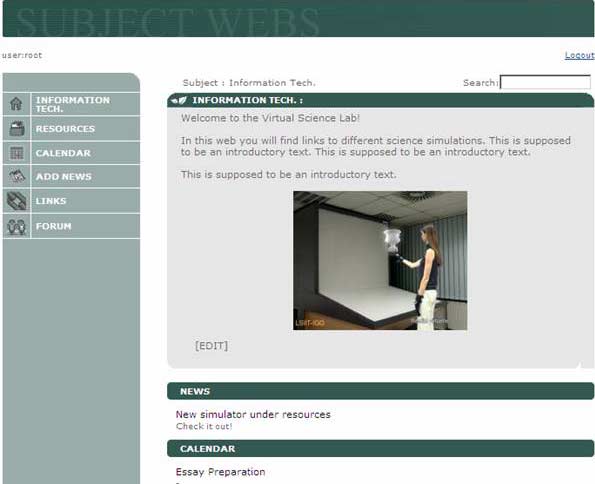
The main subject screen: |



| 1- INSTALLTION |
0. This project uses the following technologies. We recommend you are familiar with these before installing ecademicus:
· Struts
· Any JDBCcompliant Database Server (MySQL, SQLServer, Oracle,Postgres, etc)
· SQL
1. Configure
(the tested and easiest way is to download the Slide-Tomcat bundle)
2. Add to tomcat’s server.xml the following contexts:
<Context path="/rep"
docBase="../slide"
debug="9"
privileged="true"
useNaming="true"/>
<Context docBase="C:/ecademicus/" path="/ecademicus"
reloadable="true" useNaming="true">
<ResourceLink global="jdbc/ecwebs" name="jdbc/ecwebs"
type="javax.sql.DataSource"/>
</Context>
C:/ecademicus should be a folder in the server machine that has the contents of the WebContent folder of the distributable ecademicus-webs-src.zip.
Use the tomcat single-sign-on module to avoid login prompts:
<Valve className="org.apache.catalina.authenticator.SingleSignOn" debug="0"/>
A database should be created using the SQL script in the section below, and a datasource named jdbc/ecwebs to a JDBC database:
<Resource name="UserDatabase" auth="Container"
type="org.apache.catalina.UserDatabase"
description="User database that can be updated and saved">
</Resource>
<Resource name="jdbc/ecwebs" auth="Container" scope="Shareable" type="javax.sql.DataSource"/>
<ResourceParams name="UserDatabase">
<parameter>
<name>factory</name>
<value>org.apache.catalina.users.MemoryUserDatabaseFactory</value>
</parameter>
<parameter>
<name>pathname</name>
<value>conf/tomcat-users.xml</value>
</parameter>
</ResourceParams>
<ResourceParams name="jdbc/ecwebs">
<parameter>
<name>factory</name>
<value>org.apache.commons.dbcp.BasicDataSourceFactory</value>
</parameter>
<parameter>
<name>driverClassName</name>
<value>net.sourceforge.jtds.jdbc.Driver</value>
</parameter>
<!-- Maximum number of dB connections in pool. Make sure you
configure your mysqld max_connections large enough to handle
all of your db connections. Set to 0 for no limit.
-->
<parameter>
<name>maxActive</name>
<value>0</value>
</parameter>
<!-- Maximum number of idle dB connections to retain in pool.
Set to -1 for no limit. See also the DBCP documentation on this
and the minEvictableIdleTimeMillis configuration parameter.
-->
<parameter>
<name>maxIdle</name>
<value>50</value>
</parameter>
<!-- Maximum time to wait for a dB connection to become available
in ms, in this example 10 seconds. An Exception is thrown if
this timeout is exceeded. Set to -1 to wait indefinitely.
-->
<parameter>
<name>maxWait</name>
<value>10000</value>
</parameter>
<!-- MySQL dB username and password for dB connections -->
<parameter>
<name>username</name>
<value>webadmin</value>
</parameter>
<parameter>
<name>password</name>
<value>webadmin</value>
</parameter>
<parameter>
<name>url</name>
<value>jdbc:jtds:sqlserver://Maxtoshiba:1433/ecwebs
</value>
</parameter>
<parameter><name>defaultAutoCommit</name><value>true</value></parameter>
<parameter><name>removeAbandoned</name><value>false</value></parameter>
<parameter><name>removeAbandonedTimeout</name><value>300</value></parameter>
<parameter><name>logAbandoned</name><value>true</value></parameter>
</ResourceParams>
It is configured for Microsoft MSDE, but it can be changed to other Database Servers by changing the above configuration and the hibernate.properties file.
Users to the system are the slide users (using the SlideRealm). Similary, authentication is done using slide’s authentication scheme. This can be configured thoroughly (visit the slide site).
4. For this reason, the following files, that can be found in the WEB-INF/server/lib libraries need to be copied to the tomcat common/lib and server/lib respectively:
- EcadSlideRealm_common.jar
- EcadSlideRealm_server.jar
| SQL Scripts |
CREATE TABLE Cte_LinksMateria (
cod_webmateria nvarchar (50) NOT NULL ,
etitulo varchar (200) NULL ,
url varchar (300) NULL
)
CREATE TABLE Cte_Plugins (
cod_plugin varchar (16) NOT NULL ,
enombre varchar (100) NULL ,
ecomando varchar (200) NULL ,
comando_key varchar (50) NULL
)
CREATE TABLE Cte_WebMateria (
cod_webmateria char (5) NOT NULL ,
nombre nvarchar (40) NULL ,
nature ntext NULL ,
uri varchar (200) NULL ,
cod_foro int NULL ,
cssfile varchar (50) NULL ,
imagefolder varchar (50) NULL
)
CREATE TABLE Cte_mapadmwebs (
cod_webmateria nvarchar (10) NOT NULL ,
cod_actor nvarchar (20) NOT NULL
)
CREATE TABLE Cte_respuestasQuiz (
code nvarchar (30) NOT NULL ,
cod_alumno nvarchar (25) NOT NULL ,
num_pregunta int NOT NULL ,
fecha_mod datetime NOT NULL ,
opcion nvarchar (25) NULL
)
CREATE TABLE cte_news (
code int IDENTITY (1, 1) NOT NULL ,
calendarFrom datetime NULL ,
calendarTo datetime NULL ,
from datetime NULL ,
to datetime NULL ,
uploadActor varchar (50) NULL ,
url varchar (100) NULL ,
when varchar (50) NULL ,
title char (100) NULL ,
cod_webmateria varchar (50) NULL ,
calendar bit NULL ,
descrip varchar (400) NULL
)
CREATE TABLE cte_numeradores (
id_numerador nvarchar (8) NOT NULL ,
valor int NOT NULL
)
ALTER TABLE Cte_LinksMateria ADD
PRIMARY KEY CLUSTERED
(
cod_webmateria
)
ALTER TABLE Cte_Plugins ADD
PRIMARY KEY CLUSTERED
(
cod_plugin
)
ALTER TABLE Cte_mapadmwebs ADD
CONSTRAINT PK__Cte_mapadmwebs__5C648F78 PRIMARY KEY CLUSTERED
(
cod_webmateria,
cod_actor
)
ALTER TABLE cte_news ADD
CONSTRAINT PK_cte_news PRIMARY KEY CLUSTERED
(
code
)
INSERT INTO Cte_Plugins(cod_plugin, enombre, ecomando, comando_key)
VALUES('quiz','Quiz','Create Quiz,''plugins.quiz.createQuiz')
| Plugins |
Componentes de plugins:
- Código (ej. "quiz")
- Nombre (ej. Creador de Quiz)
- Comando (ej. "Crear un quiz aquí")
- Comando_key (ej. clave internacional del comando)
- Servicios:
- Creator (ej. página que permite crear el quiz)
- Renderer (ej. página que permite visualizar el quiz
- Destructor (ej. página que permite eliminar el quiz
- Creator (ej. página que permite crear el quiz)
Implementación de plugins.
- Agregar una tupla a la tabla cte_plugins (mediante la consola) con los datos correspondientes. Crear una carpeta
- Crear una carpeta en la web /subject/plug-ins/codplugin donde codplugin es el código del plugin.
- Implementar en esa carpeta al menos los siguientes jsps:
renderer.jsp
creator.jsp
destructor.jsp
- Opcionalmente podrá usar clases en el paquete edu.ecademicus.subject.plugins.codplugin para incluir clases auxiliares.
Creator JSP
El creador deberá generar un archivo .xmp (en la carpeta indicada) con el siguiente formato:
<plugin name="gallery">
<metadata>
<tag name="author" value="mgurmendez"/>
</metadata>
<content>
[Aquí va el contenido específico a cada plugin]
</content>
</plugin>
Nota: La Metadata es opcional. Lo único verdaderamente esencial es el atributo name del plugin.
Renderer JSP
Destructor JSP
destructor.jsp recibe como parámetro el uri del archivo .xmp y elimina ese archivo junto con los archivos auxiliares que usara y las modificaciones en la base que se hubieran generado.
Invocación de servicios
En el borrado de archivos, se invoca al destructor.jsp con el uri del archivo xmp. Nota: Este debará borrar el archivo.